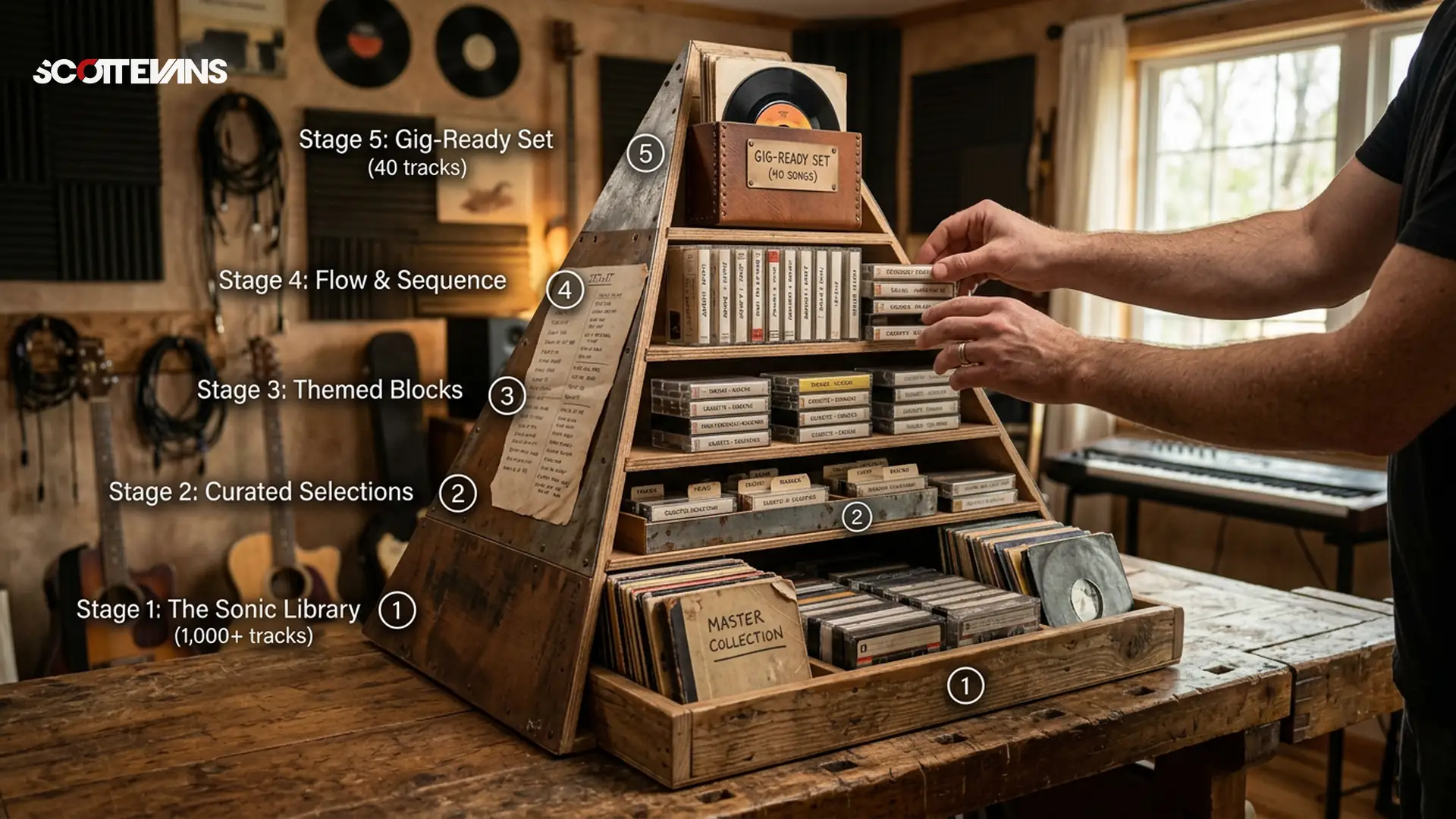
The Playlist Pyramid: Building Your Ultimate DJ Library
In my 15 years as a professional DJ, I've watched countless talented selectors crash and burn because they couldn't manage their music libraries. You know the type - they spend hours downloading "Top 100" lists, have 50,000 unanalyzed MP3s scattered across three hard drives, and spend their entire gig staring at their laptop screen with that dreaded "deer in the headlights" expression. Industry analysts call it "Serato Face," but I call it poor library management.
The Playlist Pyramid changed everything for me. It's not just a cute graphic - it's a systematic workflow that takes you from "all the world's music" to "the 40 tracks I'm playing tonight" through five distinct filtering stages. Each stage has specific tools, time commitments, and decision criteria. Get this right, and you'll build a collection that reflects your unique taste while remaining gig-ready at all times.
The Scott Evans DJ Takeaway
Stage 1: All the World's Music (Passive Exposure)
The base of the pyramid is all about exposure. Your job here isn't to find DJ tracks - it's to hear more music than the average person. The thing that separates professional DJs from hobbyists isn't technical skill (though that matters) - it's the sheer volume of music we've internalized.
I learned this lesson during my residency at a high-pressure club in Miami. The DJs who crushed it weren't necessarily the best mixers - they were the ones who could pull obscure B-sides from 1997 because they'd spent years absorbing music passively.
Here's how to engineer your environment for maximum exposure:
- Multi-room audio setup: Position Bluetooth speakers throughout your home. I'm talking bedroom, bathroom, kitchen, balcony, garage. They don't need to be audiophile-grade - just permanently powered and paired. I use a mix of JBL Flip series and some IKEA Symfonisk lamps that double as speakers.
- Car radio diversity: Program six different stations covering genres outside your comfort zone. If you play house, tune into country, jazz, and classical. Cross-pollination is where unique DJ sets come from.
- Remove friction: The goal is one-button music. When you walk into any room, you should be able to press play on your phone and hear sound immediately. No pairing, no searching, no "which speaker was that?"
The technical specification that matters here is frequency response. Consumer Bluetooth speakers often boost the low-mids (200-400Hz) to sound "full," which can mask detail in the 1-4kHz range where vocal intelligibility lives. As a DJ, you need to mentally compensate for this coloration when evaluating tracks for purchase.
Stage 2: Music You've Shortlisted (Capture)
When something catches your ear - whether you love it, hate it, or just find it interesting - capture it immediately. I use Shazam, but SoundHound and even Google Assistant work fine. The key is zero friction.
Here's my workflow: I'm making coffee, a track comes on the kitchen speaker, and I feel something - could be the groove, the vocal texture, or even "this would annoy my neighbor but work on a dancefloor." I Shazam it immediately. The track gets saved to my "Shazamed" playlist on Spotify, which auto-syncs because I've linked the accounts.
Pro Move: Don't just Shazam tracks you like. Shazam tracks that make you feel anything. The best DJ tools are often tracks you'd never play start-to-finish - acapellas, drum loops, weird sound effects, or tracks with massive drops but terrible verses. Your Shazam history should look eclectic - that's how you know you're doing it right.
The impedance matching concept applies here too - you're matching the high-impedance source (millions of tracks) to your low-impedance selection (your taste). Without this capture stage, you lose 90% of what you hear.
Stage 3: Music You've Bought (Curation)
This is where you put your money where your ears are. I do this every Saturday morning - new music drops Friday, so Saturday is review day. This is the first stage that requires actual calendar time, not just passive workflow.
Put your best headphones on - I use Sennheiser HD 25s for this because their closed-back design and 70-ohm impedance give me accurate transient response without bleed. Or crank your studio monitors. Listen through everything you shortlisted that week.
| Criteria | Questions to Ask | Red Flags |
|---|---|---|
| Danceability | Can I move to this? Is the groove locked? | Rigid quantization, no swing |
| DJ Utility | Is this a tool (acapella, loop, transition)? | Requires full track play to work |
| Uniqueness | Do I own 5 tracks that sound identical? | Generic preset sounds, formulaic structure |
| Temporal Value | Is this timeless or just trending? | Viral TikTok sounds with no staying power |
| Technical Quality | Is the mastering DJ-friendly? (Dynamic range, no clipping) | Over-compressed, distorted transients |
You're buying just a handful of tracks - literally countable on one hand. Maybe 3-5 tracks per week. This constraint forces quality over quantity. When you pay $1.99-$2.49 per track on Beatport or Traxsource, you become a critical listener.
Gear Warning: Avoid the temptation to buy "DJ pools" that give you unlimited downloads for a monthly fee. While they have their place for mobile DJs who need radio edits quickly, they bypass the curation stage entirely. You end up with 10,000 unloved MP3s that all sound the same.
Stage 4: Music You've Prepared (Analysis)
Now the technical work begins. This is where most DJs skip steps and pay the price later with "Serato Face" - that glazed look of scrolling through unorganized crates while the dancefloor waits.
First, file management. I use a folder structure like: `Genre > Subgenre > Energy Level > Track Name`. Keep it consistent across all drives. Then import into your DJ software - I currently use Rekordbox for club gigs and Serato for mobile work.
Harmonic Mixing Guide
Find compatible keys using the Camelot wheel
Here's where the deep work happens: analyzing BPM, key, and waveform data. But don't stop at the software's auto-analysis. Check the beat grids manually - especially on tracks with live drums or swing. Set memory cues at the first beat, the start of the vocal, and any breakdowns. Write custom comments in the metadata: "Works with Track X," "Save for peak time," "Acapella outro."
Pro Move: Create "Mini-Sets" - groups of 3-4 tracks that work together harmonically and energetically. I organize these by energy level and venue type. When you're in the booth and reading the crowd, you can grab a mini-set and know you have 15 minutes of guaranteed flow, giving you mental bandwidth to plan the next move.
Stage 5: Music You've Packed (Selection)
This is the final filter - the gig-ready crate. I learned this from vinyl days when my record bag physically couldn't hold my entire collection. That constraint made me a better DJ.
Here's the math: if you play 20 tracks per hour and you're booked for a 4-hour set, you need roughly 160 tracks packed. But I pack 300-400. Why? Because you need options for different directions - the crowd might want deeper house instead of peak-time techno, or the energy might drop and you need rescue tracks.
The key is pre-selection without pre-programming. You're not making a fixed playlist - you're creating a curated toolbox. I organize my packed crates by energy level (1-10) and key groups (Camelot wheel segments). This way, I can pivot instantly without scrolling through thousands of unplayed tracks.
Gear Warning: Never rely on streaming services for paid gigs. I always have local files on at least two redundant drives. Streaming requires internet, introduces latency, and often has audio quality limitations that won't cut it on high-end club systems. Your packed crate should be offline and bulletproof.
Why This Method Dominates
The Playlist Pyramid works because it mirrors how human attention actually functions - broad exposure followed by systematic filtering. Most DJs fail because they skip stages. They buy music without listening broadly first, or they pack gigs without proper preparation.
By forcing yourself through each gate weekly, you develop what I call "taste velocity" - the speed at which you can identify quality tracks in your genre. In my 15 years playing clubs from Miami to Ibiza, the DJs who consistently crush it aren't the ones with the biggest libraries - they're the ones with the most carefully filtered ones.
Tempo & Timing: tap tempo
Tap a manual tempo estimate, then use the same BPM for effects and phrases
The Scott Evans DJ Takeaway
Getting Started This Week
You don't need to overhaul your entire library today. Start with Stage 1: place a Bluetooth speaker in one new room of your house today. Download Shazam and link it to your streaming service. That's it.
Next Saturday morning, block out 90 minutes for your first review session. Put on your best headphones - I recommend closed-back models with accurate transient response for critical listening. Work through whatever you've Shazamed during the week. Buy 3-5 tracks that pass your criteria.
Then spend Sunday afternoon preparing those tracks properly in your DJ software. Set your beat grids, memory cues, and custom comments. Create your first mini-set of 3-4 tracks that work together.
Finally, before your next gig, pack a crate with double the tracks you think you'll need - organized by energy level, not alphabetically. Play the gig. Notice how much more confident you feel when every track in your crate has passed through five quality gates.
| Stage | Action Required | Time Investment | Output Quantity | Key Tool |
|---|---|---|---|---|
| Stage 1: Exposure | Passive listening | Continuous | Unlimited exposure | Bluetooth speakers |
| Stage 2: Shortlist | Capture interesting tracks | 30 seconds per find | 20-50 tracks/week | Shazam/Detection app |
| Stage 3: Purchase | Critical listening & buying | 90 min weekly | 3-5 tracks/week | Quality headphones |
| Stage 4: Preparation | Analysis & cue setting | 2-3 hours weekly | Fully analyzed library | DJ Software |
| Stage 5: Packing | Selection for specific gigs | 30 min pre-gig | 2x expected playtime | USB drives/SD cards |
Frequently Asked Questions
Stage 1 (Exposure) happens continuously - it's passive. Stage 2 (Shortlisting) takes about 30 seconds per track when you hear something interesting. Stage 3 (Purchasing) requires a focused 90-minute session weekly for critical listening. Stage 4 (Preparation) needs 2-3 hours to properly analyze and cue your new purchases. Stage 5 (Packing) takes 30 minutes before each specific gig.